





Table of contents
Get in touch
Expect response in 4 hours.
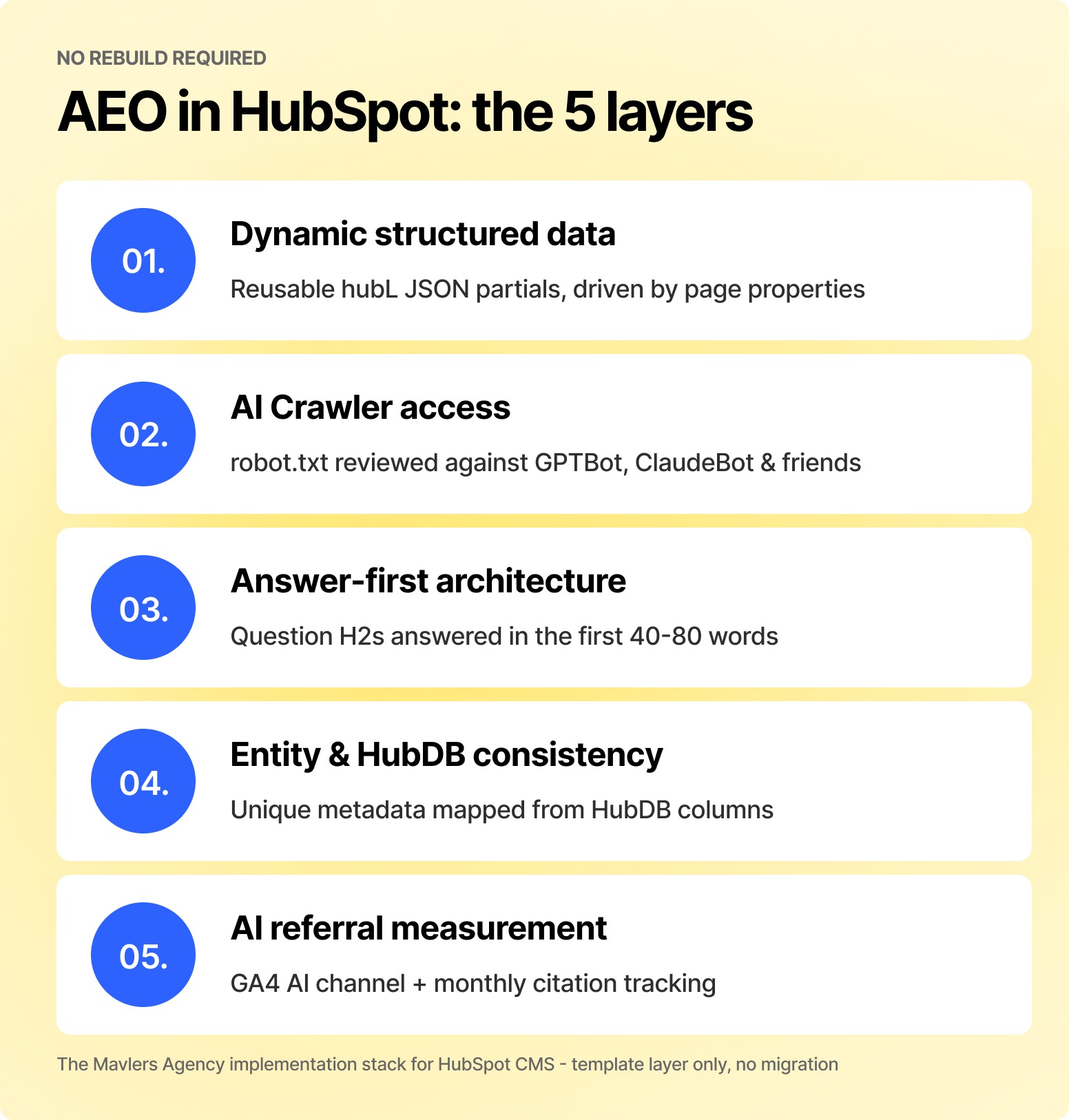
AEO implementation in HubSpot means configuring five layers: dynamic structured data through HubL, AI crawler access, answer-first content architecture, entity consistency, and AI referral measurement. No migration or replatform. We have run this exact rollout across HubSpot portals at Mavlers Agency for direct brands and agency partners, and this is the process that survives contact with real templates, modules, and deadlines.
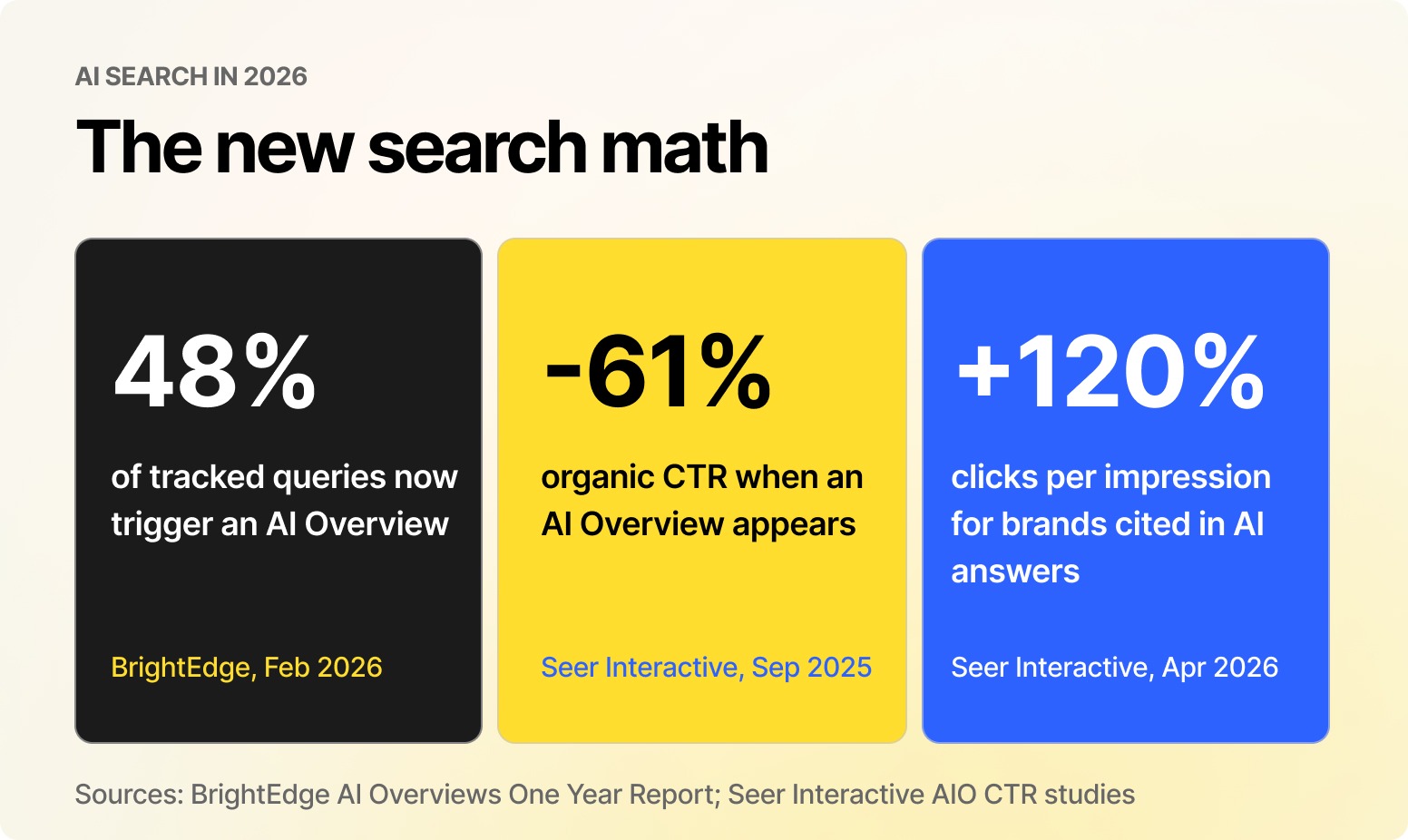
Your HubSpot site is already being read by machines that will never appear in your rankings report. Google AI Overviews now trigger on roughly 48% of tracked queries, up 58% year over year per BrightEdge, and when they appear, organic click-through rates fall by as much as 61% (Seer Interactive). Here’s the counterweight: Seer's 2026 data shows brands cited inside AI answers earn around 120% more clicks per impression than brands that are not.
Why does HubSpot GEO matter more in 2026 than it did a year ago?
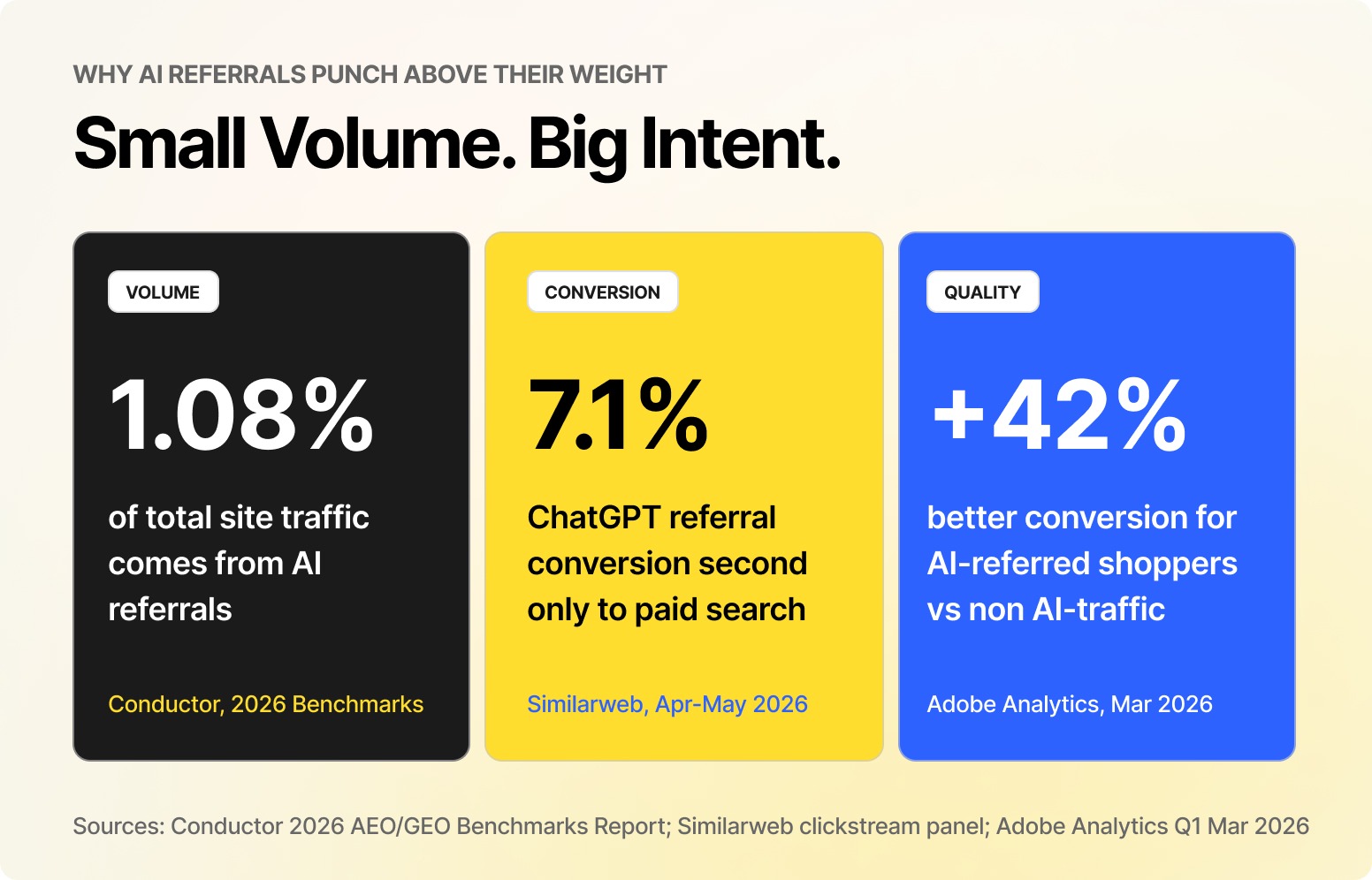
AI referral traffic still averages only about 1.08% of total sessions (Conductor, 2026), which is why most teams ignore it. They should not, and here’s why we say that. Similarweb clickstream data from April to May 2026 shows ChatGPT referrals converting at 7.1%, second only to paid search and ahead of organic, email, and social. Adobe measured AI-referred shoppers converting at 42% higher rates than non-AI traffic in March 2026.
Also, the platforms are pushing traffic harder. When ChatGPT switched to clickable in-answer brand links on May 7, 2026, Similarweb tracked a 157.7% week-over-week jump in referrals. Meanwhile, Goodie's 2026 AI Search Traffic Report found ChatGPT's share of B2B AI referrals falling from 89% to 63% as Claude, Gemini, and Perplexity grew. Its authors warn that a single-channel optimization process is “built for a market that no longer exists.” HubSpot AI optimization has to serve every engine at once. Fortunately, they all read the same signals.
What does HubSpot CMS already handle, and where do you intervene?
HubSpot CMS ships with server-side rendered HTML, native sitemap generation, BlogPosting schema on blog content, dynamic metadata controls, and topic cluster tooling. That is a stronger AI-readiness baseline than most JavaScript-heavy stacks, where primary content never reaches a crawler at all.
The gaps are consistent across almost every portal we audit: schema stops at the blog, custom modules render div soup instead of semantic HTML, HubDB pages inherit duplicate metadata, robots.txt has never been reviewed against AI user agents, and nobody is measuring AI referrals. Those five gaps are the work, and everything below closes them in order.
How do you implement dynamic structured data with HubL?
Never hardcode JSON-LD on individual pages. Instead, build one reusable HubL partial per content type, pull every value from page properties and module fields, and include it in your base template. One fix, every page, forever. Here is the pattern for blog posts:
{% if content.blog_post_author %}
<script type="application/ld+json">
{
  "@context": "https://schema.org",
  "@type": "BlogPosting",
  "headline": {{ content.name|tojson }},
  "datePublished": "{{ content.publish_date|datetimeformat('%Y-%m-%d') }}",
  "dateModified": "{{ content.updated|datetimeformat('%Y-%m-%d') }}",
  "image": {{ content.featured_image|tojson }},
  "author": { "@type": "Person",
  "name": {{ content.blog_post_author.display_name|tojson }} }
}
</script>
{% endif %}
Apply the same logic across the full template set. This is the mapping we deploy as standard in every HubSpot AI SEO engagement:
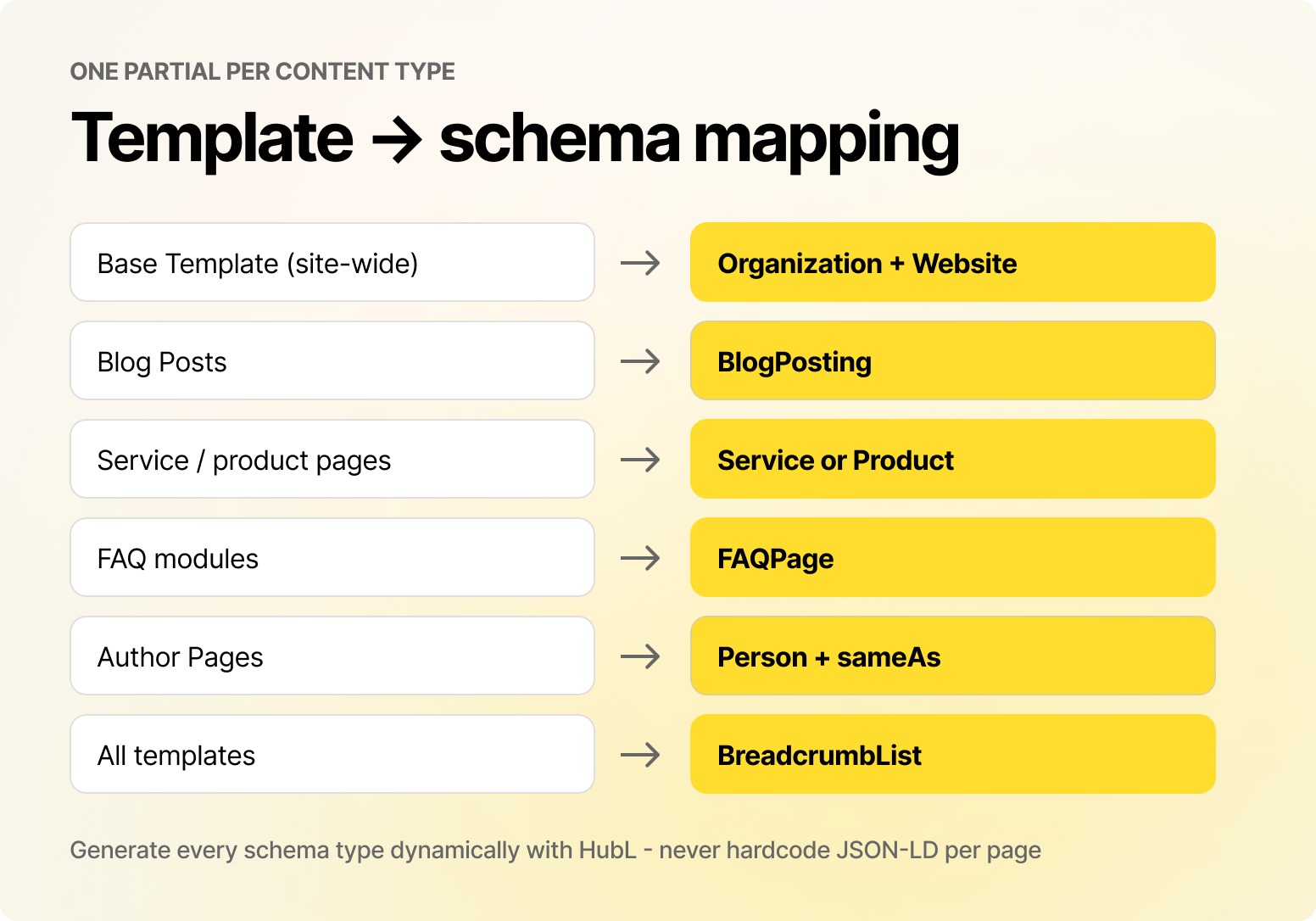
Non-negotiable rule: FAQ schema must be generated from the exact module fields that render the visible answers. When JSON-LD and rendered HTML disagree, you hand both Google and the LLMs a reason to distrust the page. Validate every deployment with Google's Rich Results Test.
Which AI crawlers should your HubSpot robots.txt allow?
This is the highest-leverage five-minute check-in in this entire guide, and it is the one most portals fail at. Open Settings, then Website, then Pages, then SEO & Crawlers, and confirm your directives do not block the agents that decide whether you get cited. The user agents that matter in 2026 are:
- GPTBot and OAI-SearchBot (OpenAI training and ChatGPT search)
- ClaudeBot (Anthropic)
- PerplexityBot (Perplexity)
- Google-Extended (controls Gemini grounding; blocking it removes you from Gemini answers without touching your Google rankings)
- CCBot (Common Crawl, which feeds multiple model training sets)
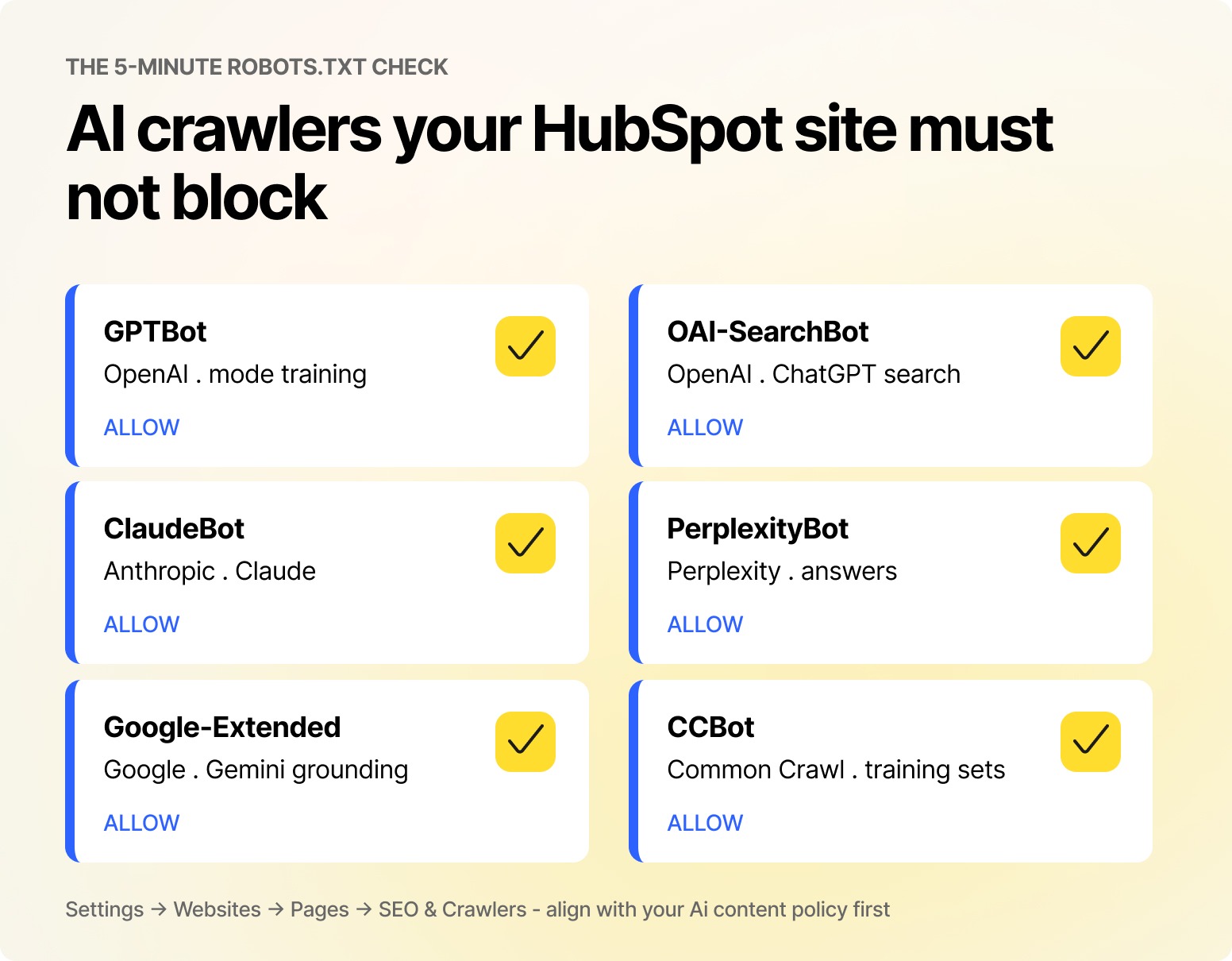
Align the decision with your organization's AI content policy first, then make it deliberately. An inherited disallow rule from 2023 is not a policy; it is an accident.
On llms.txt: implement it, but with clear eyes. It is a plain markdown index of your priority resources served at /llms.txt, it takes twenty minutes in HubSpot's file tools, and no major LLM provider has formally confirmed honoring it yet. We ship it because the cost is near zero, and it forces you to decide what your citable content actually is. Do not expect it to move numbers on its own.
How do you structure HubSpot content so AI engines can extract it?
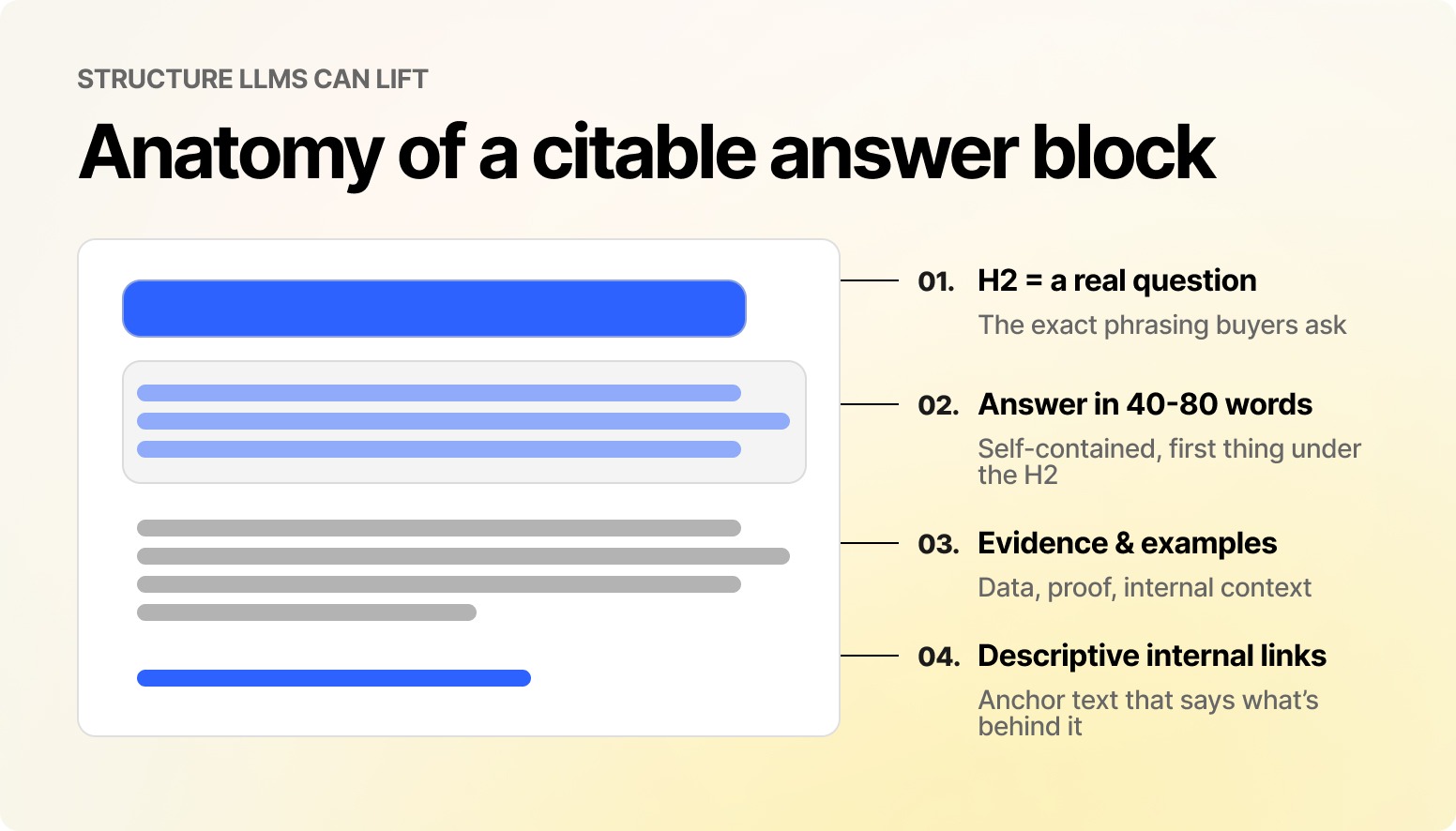
LLMs lift concise, self-contained passages. If your key answer sits under three paragraphs of preamble, a competitor's tighter passage gets cited instead. Restructure priority pages so every H2 is a real question and is answered in the first 40 to 80 words beneath it, followed by evidence, examples, and internal links. You are reading that exact structure right now.
Then push the same discipline into your custom modules, because AI systems consume rendered HTML, not your design intent:
- Render primary text server-side with HubL. Content injected by JavaScript is invisible to most AI crawlers.
- Output semantic elements: article, section, main, proper ul/ol lists, and real table markup for comparisons.
- Ensure accordion and tab modules print full content in the HTML source, not on click.
- Expose heading-level controls (H2 to H4) in module fields so editors can keep the hierarchy intact.
Finally, wire pages into topic clusters with HubSpot's Content Strategy tool and use descriptive anchor text. “Learn how to generate dynamic JSON-LD in HubSpot” tells an LLM what the destination covers. “Read more” tells it nothing.
How do you make HubDB pages citable instead of clones?
HubDB is where GEO implementation in HubSpot is most often lost. Dynamic pages that share a single template-level title, description, and schema appear to every engine that reads them as duplicates.
The fix is mapping metadata directly from HubDB columns: service name to H1 and SEO title, summary column to meta description, hero image to Open Graph image, last-updated column to schema dateModified, and category to BreadcrumbList.
Every generated page becomes a distinct, indexable, citable resource. On portals with 50-plus HubDB pages, this single change typically unlocks more AI visibility than any content rewrite.
How do you measure AI visibility in HubSpot and GA4?
Only 14% of marketers track AI and LLM citation visibility at all (GoodFirms, 2026), which makes measurement the cheapest competitive edge on this list. Three layers:
AI referral traffic. GA4 shipped a native AI traffic channel in May 2026, but it misses referrer-stripped visits. Back it up with a custom channel group that matches chatgpt.com, perplexity.ai, gemini.google.com, claude.ai, and copilot.microsoft.com, and mirror the same filter in HubSpot's traffic analytics using custom source rules.
Citation share. Run a fixed set of 25 to 50 buyer-intent prompts across ChatGPT, Gemini, Perplexity, and Claude monthly, and log whether you are cited and how you are described. At Mavlers Agency, we score this through our GEO Visibility Index (GVI), the framework we use to turn prompt testing into a trackable monthly metric rather than an anecdote.
Technical health. Revalidate structured data after every template release and keep Core Web Vitals at LCP under 2.5s, INP under 200ms, and CLS under 0.1. Slow templates waste crawl budget from AI bots exactly as they do from Googlebot.
The Mavlers Agency rollout: Render, signal, cite
Internally, we run every HubSpot AI search optimization engagement through a three-phase audit we call Render, Signal, Cite. It is the fastest way to sequence the work above without boiling the ocean:
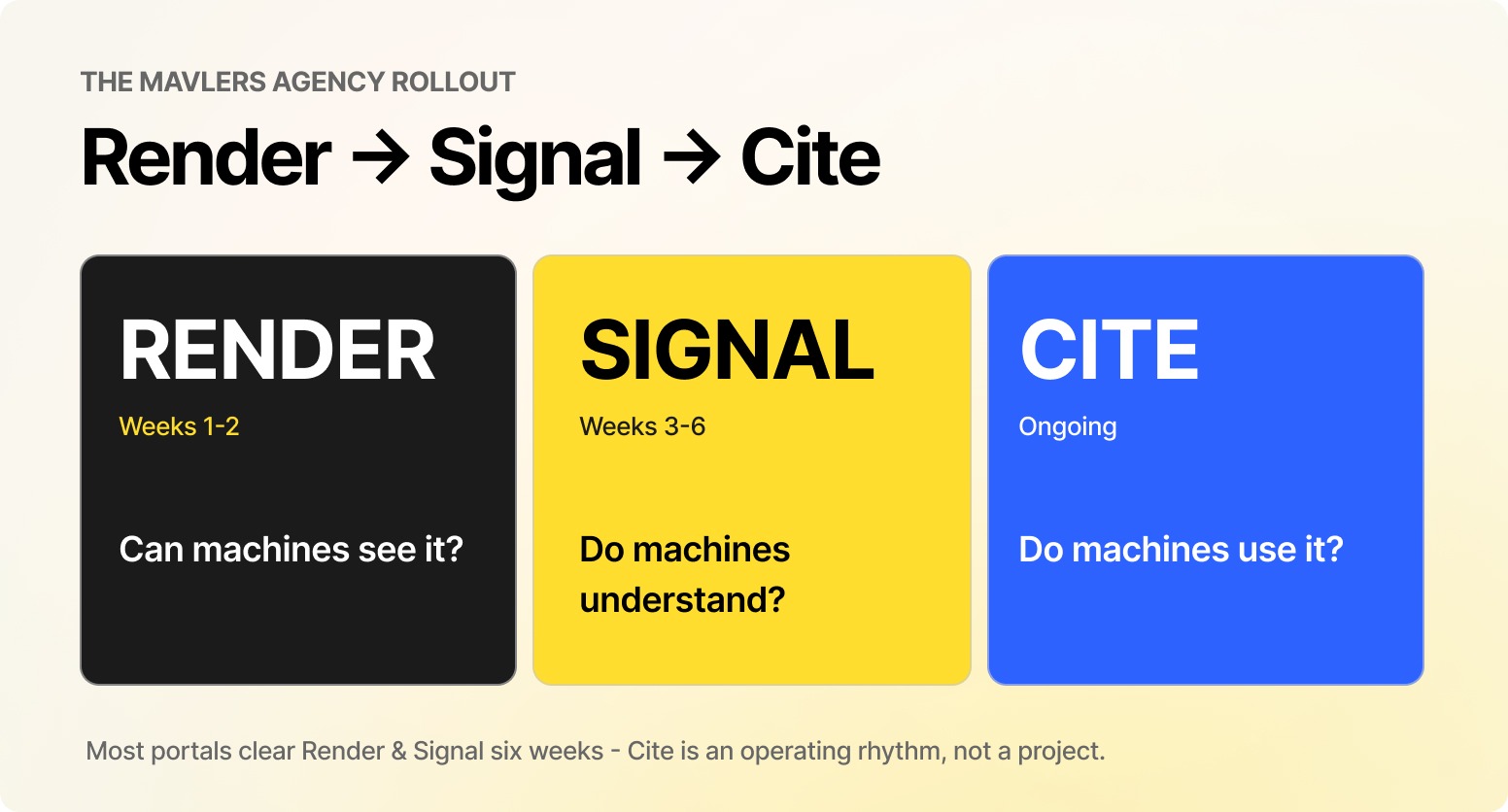
Render (weeks 1-2): Can machines see everything? Robots.txt and AI user agents, sitemap coverage, server-side rendering in custom modules, and Core Web Vitals.
Signal (weeks 3 to 6): Do machines understand it? Dynamic schema partials across all templates, HubDB metadata mapping, entity consistency across Organization schema, author profiles, and sameAs references.
Cite (ongoing): Do machines use it? Answer-first restructuring of priority pages, topic cluster buildout, monthly GVI prompt testing, and quarterly content refreshes, since AI engines place heavy weight on freshness when selecting citations.
Most portals get through Render and Signal inside six weeks. Cite never ends, and that is the point: improving AI visibility with HubSpot is an operating rhythm, not a project with a close date.
Frequently asked questions
Does HubSpot CMS support AEO out of the box?
Partially. Server-side rendering, sitemaps, and the default BlogPosting schema come free. Dynamic schema for other templates, semantic module markup, answer-first structure, and AI crawler configuration all require deliberate implementation.
Can HubL generate structured data automatically?
Yes. HubL reads page properties, blog settings, module fields, and HubDB columns at render time, so one well-built partial outputs accurate JSON-LD on every page it touches with zero per-page maintenance.
Do I need an llms.txt file in 2026?
It is optional. No major LLM provider has confirmed honoring it, but implementation costs minutes and organizes your citable resources. Treat it as cheap insurance, not a ranking lever.
How do I track ChatGPT traffic to my HubSpot site?
Use GA4's native AI traffic channel, plus a custom channel group that matches chatgpt.com, perplexity.ai, gemini.google.com, claude.ai, and copilot.microsoft.com. Replicate the filter in HubSpot with custom traffic source rules. Expect undercounting, since a large share of AI visits arrive with stripped referrers.
How long does GEO implementation in HubSpot take?
For a typical portal, technical foundations take two to three weeks, schema and HubDB take another three, and content restructuring rolls out over one to two quarters, prioritized by page. Measurement starts on day one, so you can prove the lift.
Where to go from here
If you want a deeper look at the measurement methodology, our GEO measurement resources cover the GVI framework in full. And if you would rather hand the whole rollout to a team that has done it across dozens of portals, Mavlers Agency's AEO and GEO services and technical SEO team run Render, Signal, and Cite end-to-end, for direct brands and as a white-label delivery partner for agencies.
Here are some relevant reads that might be of interest to you;
8 AEO mistakes that are quietly stalling your agency’s profit margins
5 reasons AEO is the highest-margin service agencies can offer in 2026