







Table of contents
Get in touch
Expect response in 4 hours.
Offline conversion tracking (OCT) connects an online ad interaction to a conversion that happens later outside the browser. Interactions such as a sales-qualified lead, phone sale, signed contract, in-store purchase, or CRM deal.
The process usually captures a click ID or privacy-safe customer identifier, stores it in a CRM, and sends the later conversion back to the ad platform so bidding algorithms can optimize for revenue, not just clicks.
The reason OCT matters now is that paid media platforms are increasingly using machine learning to decide which users to reach, which signals to prioritize, and where to allocate budget. They’ve been sending the same message for years. Your bidding system is only as useful as the conversion data feeding it.
Google said it on the Ads Decoded podcast. Meta has built its entire Advantage+ pitch around it.
Google's guidance on Data Strength puts it like this -
Finding better intent users means finding users more likely to convert for your business. Journey Aware Bidding, the framework Google is currently developing, pulls every conversion touchpoint into bidding models. The system wants to know what a real customer looks like. Right now, most accounts aren't telling it.
Advertisers have improved online conversion tracking with cleaner events, enhanced tracking, better tagging, and stronger first-party data practices. The infrastructure for measuring an online form fill or purchase is quite mature.
The harder problem begins after the browser closes. The customer may speak to a sales representative, book a consultation, visit a store, sign a contract, or complete a purchase over the phone.
Those offline actions usually live in a CRM, sales pipeline, call platform, point-of-sale system, or billing tool rather than in the ad platform.
If those downstream outcomes never make it back to the platform, campaigns are optimized around incomplete signals. The platform may learn to find people who submit forms, rather than people who become customers.
That is why offline conversion tracking helps you:
- Map fragmented online-to-offline customer journeys.
- Connect advertising spend with revenue and pipeline outcomes.
- Give bidding systems a clearer picture of a valuable customer.
- Compare campaigns by qualified outcomes instead of cheap lead volume.
- Reduce the gap between marketing reporting and sales reality.
Whether you run Google, Meta, Microsoft, or LinkedIn campaigns, the goal is the same - send better business signals back into the optimization loop.
This playbook gives you the infrastructure to connect ad spend to offline conversions. We’ve built these data loops for enough accounts to know one thing: the marketers who win aren't the ones with the most clicks. They are the ones who give the AI the right profit signals.
What are offline conversions?
Offline conversions are valuable business outcomes influenced by digital advertising but completed outside the website session or after the original online conversion. These offline outcomes cover more ground than most marketers account for. They include any milestone that moves a lead closer to revenue, not just the final closed deal:
- A trial user becomes a paying customer after a sales call.
- A funded deal closes 60 days after the first demo.
- A customer makes an in-store purchase after clicking a paid social ad.
- A student visits a campus and enrolls after discovering the institution through paid search.
- A car buyer visits a dealership after several weeks of online research.
- A prospect books a consultation by phone.
- A customer renews or expands a subscription through an account manager.
In B2B specifically, the lead-to-sale conversion tracking gap is structural.
So, for sake of example, a lead fills out a form and registers as an MQL. That part most teams can measure.
But from MQL to SQL to opportunity to closed-won, every stage happens inside a CRM, on calls, in meetings. This offline touchpoints data is neither attributed to the ad that drove it nor is it passed back to the bidding algorithm.
These actions don’t happen on your website, but are catalyzed by your paid ads.
Said another way: Offline conversions are the outcomes your ad spend is trying to drive, but your platform can’t see by default.
It’s with the offline conversion tracking you tell the platform which online conversions ended up becoming revenue-generating customers.
What is offline conversion tracking (OCT)? Why most performance campaigns miss true ROI?
Offline conversion tracking is the process of sending offline business outcomes back to the advertising platform that influenced the original interaction.
Doing so helps advertisers connect the ad spend impact to real business outcomes. But more importantly, the real "end game" of feeding your CRM’s "gold" data back into the ad platform’s AI tells it to stop bidding on users who only fill out forms and start bidding on leads who actually give you money.
In short: Tracking offline conversion is essentially making sure that the ad platform’s bidding models are trained to find the leads that are of higher value and higher propensity to convert for you.
Having understood the historical context of leads and which keywords, devices, demographics, and times of day to correlate with them, algorithms will go after similar users in future.
Offline conversion tracking applies across B2B, B2C, lead generation, and e-commerce. Anywhere the customer journey crosses from digital to real world before the transaction completes.
The high-stakes advantages of OCT when you implement it correctly
- You can direct bidding algorithms to go after the most valuable leads based on actual margins.
- You can include or exclude instances where a conversion changed after the pixel fired. This includes sales made via a rep, returns that happened 30 days later, or sales to repeat customers.
- You stop relying on flawed attribution models to guess which path works.
- You provide the signals necessary for AI to find your "Power Audiences", the small percentage of users who drive the majority of your revenue.
Without OCT, you under evaluate high-performing campaigns. And the right intent never makes it to bidding models.
Ultimately, the combination of powerful automation and low-quality conversion data wastes your budget in only producing high volume, low close rate, and a sales team that doesn't trust the leads coming from paid media.
The honest constraint?
The offline conversion setup requires operational discipline. Something that the technical configuration alone can't provide. The data lives in the CRM. Someone has to own, keeping it clean and updating it on a reliable cadence.
Sadly, that's where most offline conversion tracking implementations break down, not in the platform setup, but in the week-to-week data hygiene that makes the upload pipeline trustworthy.
How does offline conversion tracking work?

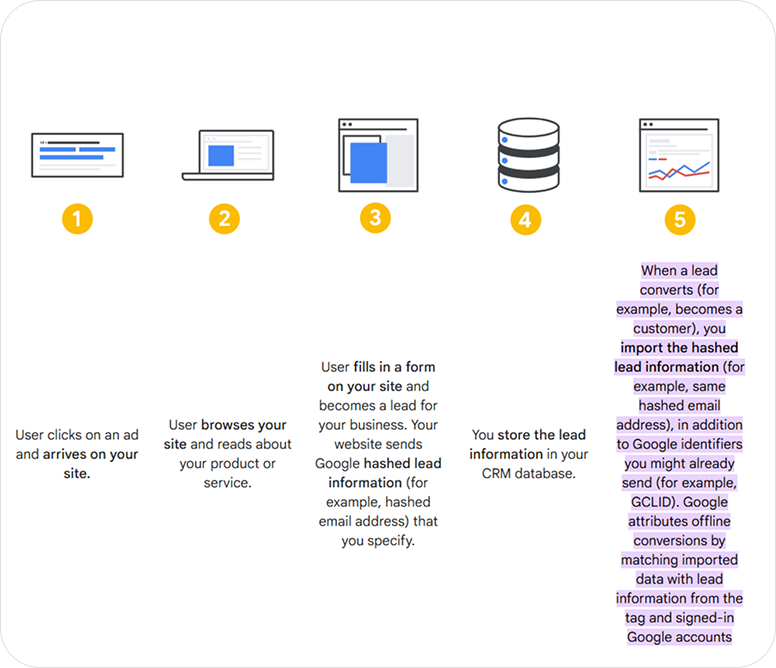
The core flow of offline conversion tracking across platforms is:
- A user clicks an advertisement.
- The platform appends a click identifier to the landing page URL, where supported.
- Your website captures that identifier and stores it with the lead.
- The lead record also stores available first-party identifiers, such as email or phone, according to your consent and privacy requirements.
- The lead progresses through your CRM, sales process, call system, store, or billing system.
- A qualifying event is created with a timestamp, value, event name, and stable order or event ID.
- The event is sent to the relevant ad platform through a CSV, native integration, automation tool, server-side system, or API.
- The platform attempts to match the event to the original ad interaction.
- You validate upload status, match quality, attribution, and downstream business results.
What are Click IDs and Hashed PII?
To link an offline conversion (like a sale in your CRM) back to the online ad interaction, you need a shared identifier. It’s a piece of data that exists in both systems and serves as a matching key. The platform uses it to attribute an offline activity to the specific campaign, keyword, and creative that drove the original visit.
Click IDs
Click IDs are platform-specific identifiers attached to an ad click. Common examples include:
- Google Ads - GCLID
- Microsoft Ads - MSCLKID
- Meta - FBCLID and browser or server event identifiers
- LinkedIn - `li_fat_id` or other platform-supported identifiers
- TikTok - `ttclid`
- Pinterest - `epik`
Your site should capture the identifier, store it with the lead, and pass it through the CRM until the conversion is ready to upload.
Hashed first-party data
Platforms may also accept privacy-safe representations of first-party identifiers such as email and phone. The value is normalized and then transformed using SHA-256 before it is sent, where required.
Hashing is not encryption and does not make personal data anonymous. It is a matching technique. Your organization still needs an appropriate lawful basis, privacy disclosures, consent handling, retention policy, and data-sharing agreements where applicable.
The strongest architecture usually captures both the click ID and the available first-party identifiers. If one signal is missing or cannot be matched, another may still work. Do not rely on a single identifier without testing its coverage.
The Mavlers rule: We never rely on a single signal. The right default is a dual-identifier architecture. Capture both the Click ID and the hashed user data at every form submission. Use the Click ID as the primary match, and use hashed PII as the fallback.
Google's internal data confirms this. It says,
How to prepare user data before hashing it for privacy-safe matching
Before you send user-provided data into an ad platform, you first clean it into a standard format. Then you hash it with SHA-256 so the raw value is not exposed.
If you skip the cleanup step, the same person can produce different hashes and you might not get the highest match rates. The ad platform fails to match the hashed value to the user it already knows, which means weaker offline conversion matching.
The normalization rules are simple:
- Email: Lowercase the entire string and trim all whitespace. John@Gmail.Com and john@gmail.com do not produce the same hash.
- Phone: Strip all formatting - spaces, dashes, and parentheses. Convert the number to the E.164 format (e.g., +12223334444).
- Name: Lowercase and trim. Split first and last names into separate fields before hashing.
Offline conversion tracking by platform
Because Google is an established player in this space, most performance marketers think Google ads offline conversion tracking is the only option. The reality is that every major ad platform - Meta, LinkedIn, Microsoft - now has a dedicated offline pipeline.
1. Google Ads
Google has the most mature OCT infrastructure of any platform. They also offer three distinct methods for tracking offline conversions - GCLID, ECL, GBRAID, and WBRAID. We’ve broken down the three approaches below.
- GCLID capture remains useful when auto-tagging and landing-page storage are working correctly. However, it should not be your only signal.
- Enhanced Conversions for Leads (ECL) uses normalized and hashed first-party information to help Google match later lead outcomes.
- GBRAID and WBRAID are privacy-preserving identifiers for specific traffic contexts and should not be treated as a universal substitute for individual CRM matching.
2. Meta (Facebook / Instagram)
Meta's offline conversion tracking infrastructure consists of connecting your marketing data with Meta's ad optimisation systems through the Conversions API (CAPI).
The good thing about Meta Ads is that it takes any information you can provide. Facebook Click ID, Facebook Pixel Cookie, hashed name, hashed phone number, email address, country, state, ZIP Code…
Google ads, on the other hand, relies on a single parameter. Which is a disadvantage as the more data you share with the system, the more are the chances that the offline conversions get attributed to the right person and the right ad.
Offline conversion tracking on Meta for B2B SaaS
For B2B SaaS, the useful conversion is often not the initial lead. It is a later pipeline milestone such as sales-qualified lead, demo completed, opportunity, or closed won. Meta’s standalone Offline Conversions API was discontinued in May 2025. New implementations should use Conversions API and datasets for applicable offline, CRM, phone, and in-store events.
If your B2B SaaS leads come from Meta Ads but deals close through sales calls, connect your CRM to Meta using the Conversions API (CAPI).
The basic flow is:
Meta ad → Lead → CRM → Sales call → Qualified/Closed-Won → Meta CAPI
1. Capture the lead's data
When someone submits a form after interacting with your Meta ad, capture available identifiers such as fbclid, email, phone number, and lead ID. Store them in your CRM with the lead record.
2. Track the sales stage in your CRM
As the lead moves through the pipeline, update standardized stages such as:
Lead → Demo → Sales-qualified → Opportunity → Closed-Won
Choose the stage that best represents a valuable conversion for your business.
3. Send the offline conversion to Meta
When the selected stage is reached, send the conversion event and relevant customer data from your CRM to Meta through Conversions API.
You can do this through:
- Native CRM integration — easiest for supported platforms
- Zapier/Make — useful for no-code workflows
- Custom CAPI integration — best for complex or highly customized setups
4. Use the data to measure what actually drives revenue
Once Meta receives and matches the downstream conversion, you can evaluate campaigns based on qualified leads, opportunities, closed deals, or revenue, rather than relying only on form submissions.
3. Microsoft advertising
Microsoft Ads supports offline conversion goals and offline conversion applications through its advertising services. The workflow generally involves creating the appropriate offline conversion goal, retaining the Microsoft Click ID (MSCLKID), and uploading the later conversion with its time and value.
Most of the Microsoft Ads offline conversion tracking setup is similar to Google ads offline conversion tracking.
But a few caveats here:
- One must wait at least two hours after creating a new conversion goal before the first upload. Attempt an upload sooner and Microsoft will reject the data. Without an error message sometimes.
- Even after a "Success" confirmation, data can take up to six hours to appear in your dashboard. Better not to verify your data or troubleshoot a "broken" setup until at least six hours have passed since the upload.
- You should wait at least one hour after the actual ad click occurred before attempting to upload a conversion for that specific MSCLKID. The system requires this buffer to register the original ad interaction before it can accept a matching offline event.
4. LinkedIn
LinkedIn is particularly relevant for high-ticket B2B campaigns where a lead may take weeks or months to become pipeline.
If you have low lead volume or zero developer resources, manual CSV uploads work fine. You export your CRM data, format it to LinkedIn’s specific template, and upload it into Campaign Manager. This is the "entry-level" approach for agencies still proving the value of LinkedIn spend to a skeptical client.
Serious B2B advertisers eventually graduate to the LinkedIn Conversions API (CAPI). You can send data through either:
Direct integration: Needs technical expertise but offers the most control over data mapping and ID matching.
Or,
No-Code Automation: Partner integrations with tools like Zapier, LeadsBridge, or LiveRamp connect your CRM and LinkedIn. They monitor your system for "Closed-Won" events, format the payload, and transmit it via API.
Offline conversion tracking for influencer campaigns
When an influencer drives customers to a physical store, traditional click tracking can't reliably connect the influencer's post to the eventual purchase. The best approach is to give each influencer a unique, trackable identifier - such as a promo code - and match it to POS sales.
1. Give each influencer a unique promo code
Assign a code such as SOPHIA20 to each creator and make it redeemable in-store.
Your POS system records every purchase using the code, allowing you to attribute sales and revenue to individual influencers.
Best for: Direct, transaction-level attribution.
2. Use receipt-based tracking
If custom promo codes aren't supported at the register, ask customers to upload their receipts through a campaign landing page in exchange for a reward.
The receipt can then be used to verify the store, purchase date, and products purchased.
Best for: Retail campaigns where POS-level influencer codes aren't possible.
3. Use retailer or loyalty-card data
For campaigns with large retail chains, retailer loyalty data or data-clean-room solutions can match campaign audiences or exposure data against in-store purchases.
Best for: Large-scale campaigns where retailer data is available.
4. Measure incremental sales with a lift study
For larger influencer campaigns, compare sales in regions exposed to the campaign with similar regions that weren't exposed.
This measures whether the campaign generated incremental in-store sales rather than simply taking credit for purchases that would have happened anyway.
Best for: Measuring campaign-level impact when individual purchases can't be directly attributed.
Which method should you use?
Use unique influencer promo codes when you need direct attribution. If that's not possible, use receipt tracking or retailer data. For large campaigns where deterministic attribution isn't available, use a geographic lift study to measure incremental sales.
CRM offline conversion tracking
CRM offline conversion tracking connects a CRM stage change to an advertising conversion event.
A practical CRM workflow looks like this:
- Capture the original click ID and permitted first-party data when the lead arrives.
- Store the values in dedicated CRM fields.
- Define which CRM stages qualify as conversion events.
- Trigger an automation when the stage changes.
- Add the conversion timestamp, value, currency, event ID, and consent status.
- Send the event to the ad platform.
- Log the platform response and retry failed events.
The method works with HubSpot, Salesforce, Pipedrive, Zoho CRM, Microsoft Dynamics, HighLevel, and custom databases. The field names differ, but the architecture is the same.
Do not send every CRM update as a new conversion. Use a stable event ID and an explicit event policy so that the same customer does not produce duplicate conversions when records are edited or workflows are retried.
4 ways to set up offline conversion tracking
Offline conversion tracking usually means taking a conversion that happens in your CRM or sales process, then sending it back to ad platforms. The implementation method is just the path you use to move that data from your business systems into those ad platforms. There are options to implement it.
Option 1: Manual CSV or Google sheets upload
This is the simplest setup. You export closed deals from your CRM on a schedule, format the file exactly as the platform expects, and upload it manually or through a scheduled sheet import.
It works fine for low volume or for testing whether your data is even matchable. But it gets fragile fast because humans have to handle formatting, timestamps, click IDs, phone normalization, and hash prep. If you botch a field or the export timing, the upload happens, but with bad data.
Option 2: No-code automation
This is your sweet spot. Instead of manual chores, let tools like Zapier, Make, or n8n act as the connector. They capture offline conversion actions, and then integrate the data automatically to the ad platform. The benefit is speed. You can launch and are not required to build a full engineering stack.
Any downside? Yes, “no-code” still means a lot of setup work. You still have to-
- Map fields correctly
- Format phones in E.164
- Normalize emails
- Hash data
- Manage time zones
- Handle webhooks,
- and suck up the failures.
Plus, at meaningful volume, free plans usually are not enough, and self-hosted tools trade subscription cost for maintenance overhead.
Option 3: Dedicated OCT platforms
These are specialized offline conversion tracking tools built for this exact job. They usually handle click ID capture, PII normalization, SHA-256 hashing, uploads to multiple platforms, and reporting in one place.
This option makes the most sense when you are running tracking across several ad platforms. Also works when the team needs visibility into match rates, upload status, and email alerts when conversions approach the upload window deadline.
For teams running OCT across Google, Meta, Microsoft, and LinkedIn simultaneously, the operational clarity explains the ‘why' behind the subscription cost.
Option 4: Direct API or server-side integration
This I think is the most controlled approach over the data pipeline typical of technical teams and large scale operations.
That’s because the engineering team builds a direct connection from your CRM or warehouse into each ad platform’s API. So your business controls exactly what gets sent, when it gets sent, and how retries and errors are handled.
It is the strongest choice for scale and reliability. No wonder, it is also the most expensive to build and maintain.
Plus, the need to monitor, alert, and document never goes away. Otherwise, API changes or authentication glitches can break the pipeline. If nobody notices until ROAS drops, the setup has already failed operationally.
How to choose the setup for offline conversion tracking
- Use manual uploads: If you are validating the process or have a small number of conversions.
- Use no-code automation: If you want speed but don’t have engineering support.
- Use dedicated OCT platforms: If you want multi-platform tracking with reporting and diagnostics.
- Use direct API integration: If you have a technical team and need full control at scale.
Is hashed data anonymous? How to manage privacy and compliance in OCT?
If a team thinks hashing data makes it “anonymous”, I’ll ask them to smell the coffee. The legal reality is that it’s still personal data, and the liability is real.
Under GDPR, SHA-256 hashed email addresses and phone numbers are classified as pseudonymized data, not anonymized.
Because a hash can be reversed if the original data is available—a process called a "dictionary attack"—it retains full legal personhood.
Also, hashing the data before it hits the platform does not eliminate the risk of processing that data without consent in the first place.
Many marketers enable features like Google’s Enhanced Conversions or Meta’s Advanced Matching and assume the platform handles the legalities. These tools often "scrape" form data directly from the browser to improve match rates.
Privacy experts are exactly fans of this practice. GDPR mandates data minimization. It means you should collect the data that’s necessary for a specific purpose. If your system is scraping every form field and sending it to a platform without your users’ knowledge, it’s a compliance risk.
Said another way, every compliance obligation that applies to raw PII applies equally to its hashed form. Now, coming to maintaining compliance in offline conversion tracking.
GDPR requirements (EEA, UK, Switzerland)
- You need a lawful basis to process and share hashed identifiers with ad platforms.
- Your privacy policy must explicitly disclose the sharing of hashed identifiers for conversion matching.
- You need a Data Processing Agreement with each platform you share data with.
Cross-border transfers to US platforms (Google, Meta, LinkedIn) require an applicable transfer mechanism, currently the EU-US Data Privacy Framework.
Consent mode v2 — Mandatory for Google in EEA/UK
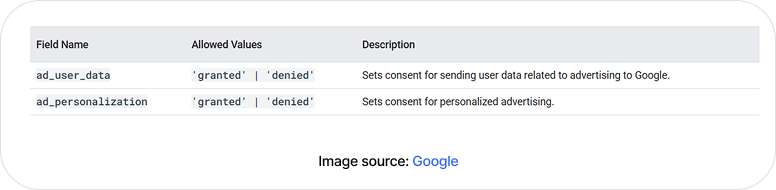
- Running Google campaigns targeting users in the EEA, UK, or Switzerland?
- Consent Mode v2 is mandatory. You must signal ad_user_data and ad_personalization consent on every conversion upload. Users who have not consented cannot have their data used for offline conversion matching. Your consent management platform (CMP) must be integrated with your OCT pipeline. When a user denies consent, that record must be excluded from all uploads.
CCPA / CPRA (California)
California favours an opt-out model over the opt-in model we see elsewhere. Businesses must provide a 'Do Not Sell or Share My Personal Information' mechanism and honour Global Privacy Control (GPC) signals.
For businesses, this means you can’t just bury your head in the sand; you must provide clear 'Do Not Sell or Share My Personal Information' options and respect Global Privacy Control (GPC) signals like they’re a firm 'no thank you.'
Sending hashed customer data to ad platforms for cross-context behavioral advertising is a move that likely triggers those opt-out requirements. So, ensure your OCT pipeline respects GPC signals and excludes opted-out records from all uploads.
Offline conversion tracking best practices
1. Data capture
- Capture GCLID, MSCLKID, FBCLID, and li_fat_id in hidden form fields via JavaScript on every landing page.
- Store click IDs in a first-party cookie as a backup as URL parameters are lost when users navigate between pages.
- Capture email and phone at form submission for ECL hashing. Capture what is available even if fields are optional.
- Test every form variant: multi-step forms, chatbot lead capture, and phone-call-to-form flows all need separate capture logic.
- Verify GCLID capture in staging before every campaign launch.
2. Normalization and hashing
- Email: lowercase entire string, trim whitespace, remove dots for Gmail addresses
- Phone: strip all formatting, convert to E.164 (+[country][number]) before hashing
- Name: lowercase, trim, split into first_name and last_name separately
- Apply normalisation before SHA-256 — one uppercase letter = different hash = failed match
- Test hash outputs with a known input before deploying: validate the output matches expected SHA-256 for your normalised test string.
3. Upload cadence and data freshness
- Upload conversions daily at minimum — stale data degrades Smart Bidding performance.
- For high-velocity B2C businesses, upload every 6–12 hours; some API integrations support near-real-time.
- Use order_id or event_id as a deduplication key on every upload — prevents double-counting from repeated runs or parallel tracking.
- Build a retry mechanism for failed uploads — a single missed day can create attribution gaps that are hard to backfill.
4. Long sales cycles (90+ Days)
- Set mid-funnel milestones as conversion actions to keep attribution signal within the upload window.
- Assign realistic fractional values to mid-funnel milestones to maintain value-based bidding signals.
- Use ECL as your primary method. Hashed PII matching via Google Account extends your effective attribution beyond the GCLID window.
5. Monitoring and maintenance
- Check Google Ads Offline Data Diagnostics weekly.
- Set email or Slack alerts for upload failures. API integrations should have monitoring built in.
- Audit CRM field mapping quarterly to detect any change in conversion action IDs.
- Monitor match rates monthly. And if it declines, it is an early indicator of upstream capture issues.
- Re-evaluate tROAS and tCPA targets every 90 days as OCT data matures and Smart Bidding recalibrates.
Before you implement OCT
When you change the optimization goal from form fills to qualified leads or revenue, performance may look worse before it looks better.
1. Your Cost Per Lead will likely spike
Once the platform receives better downstream signals, it may stop prioritizing the cheapest leads and begin competing for users more similar to your valuable customers. Lead volume may decline and cost per lead may rise.
That does not automatically mean the campaign is failing. A higher-cost lead that produces pipeline may be more efficient than a cheap lead that consumes sales-team time without progressing.
2. You'll need to report on different metrics
Do not judge an OCT rollout by CPL alone. Add:
- Cost per MQL
- Cost per SQL
- Cost per opportunity
- Cost per closed-won deal
- Pipeline generated per dollar
- Revenue or gross margin per dollar
- Lead-to-opportunity and opportunity-to-close rates
If one in three form fills becomes an SQL, an SQL target will naturally be higher than a form-fill target. Leaving the old target unchanged can restrict delivery while the platform is trying to optimize for a deeper event.
The bottom line
Offline conversion tracking doesn't polish your paid ad performance reports. It feeds the bidding algorithms the type of leads to go after, beyond the initial click.
That can absolutely help advertisers improve their ad performance, and the effect compounds over time as Smart Bidding accumulates better signals.
The setup takes honest effort. Mapping the sales process. Configuring data capture correctly. Normalising before hashing. Keeping uploads consistent. Monitoring diagnostics. Getting consent architecture right from the start.
Once the ball gets rolling, it's not much complicated, but it does require discipline.
As it's working, the nature of the conversation with clients changes. You stop arguing about which campaigns drive leads and start talking about which campaigns drive customers. You stop over-investing in volume and start investing in value.
If you're managing offline conversion tracking across multiple client accounts and need a team that handles setup, diagnostics, and ongoing monitoring as part of managed paid media, that's work Mavlers Agency does. The nitty-gritty details in this playbook is a giveaway on how we approach it for the accounts we run.
Frequently asked questions
Is there a way to measure offline conversions without a huge dev team setting up custom integrations?
Often, yes. Start with a native CRM integration, scheduled upload, manual spreadsheet uploads, or no-code workflow. Even a no-code setup still needs someone to own field mapping, privacy controls, deduplication, monitoring, and troubleshooting.
How to verify that GCLID capture is working before launch?
Submit a test form on your landing page. Then check your CRM to confirm the GCLID was captured in the hidden field. If it's missing, follow the breadcrumbs:
- Does your JavaScript load on the form page?
- Does the hidden field name match what the script targets?
- Check that auto-tagging is enabled in Google Ads account settings.
- For multi-step forms, confirm GCLID passes through every step and is present at final submission.
How do I set up offline conversion tracking between my CRM and my ad platforms?
The easiest route is using Native CRM Integrations. If you use a major CRM (like HubSpot, Salesforce, or Zoho), you can link your Google or Meta ad accounts directly through a visual settings menu. You simply select which CRM deal stage (e.g., "Closed Won") should count as a conversion, and the systems sync automatically.
Is offline conversion tracking worth setting up for low-volume accounts?
If you’re seeing fewer than 30 offline conversions a month, the 'Smart Bidding' robots are going to have a tough time finding the patterns they need to really perform. You’ll still get a much clearer picture of your actual ROI, but the bidding impact will be limited. The workaround is to track earlier-funnel milestones. It gives the system more signals to work with.
How long before OCT starts affecting Smart Bidding performance?
Google's guidance is 4-6 weeks for the learning period to complete. In practice, the algorithm begins shifting spend within 2-3 weeks of consistent uploads. Don't make major budget decisions or draw performance conclusions during the learning period Evaluate after the full 6-week cycle.
Can OCT be used with Performance Max campaigns?
Yes, and it's especially important for PMax. PMax uses all account conversion signals including offline actions to determine where to show ads across every Google surface. The requirements are identical: offline conversion actions must be set to Include in Conversions and Optimize. PMax is more sensitive to data quality than standard Search campaigns . Weak OCT signal leads to low-value traffic by default.